People often decide where to eat in a matter of minutes.
They might search Google, look at a few photographs, check the menu, see whether you're open and work out how far away you are. They might want to know whether you take bookings, offer takeaway or delivery, or have something suitable for everyone in their group.
If they can't find the answer easily, they can move on to somewhere else.
Getting your restaurant, cafe or takeaway online doesn't mean you need to be everywhere or spend every day creating social media posts. You need a reliable place where people can find the information they actually need, and you need to make sure the important details are consistent wherever they find you.
For most food businesses, that starts with a website, a Google Business Profile and a clear route to book, visit or order.
Start with what a customer wants to know
Before worrying about colours, logos or slogans, think about what someone needs to know before choosing your business.
What kind of food do you serve?
What's on the menu and roughly how much does it cost?
When are you open?
Can people eat in, collect or order for delivery?
Do they need to book?
Where are you?
And what should someone do if they have an allergy or dietary requirement?
Those answers should be easy to find on a phone.
A customer looking for somewhere to eat probably isn't going to spend ten minutes clicking through your website trying to find your opening hours or menu. If the important information is buried, the website is making the decision harder than it needs to be.
Your menu is one of the most useful things you can put online, so make it easy to use.
A photograph of a printed menu may be fine as an extra, but it can be difficult to read on a phone. PDFs have their uses too, particularly if you want people to download or print the menu, but they shouldn't be the only way someone can see what you serve.
A proper menu page is usually much easier.
Use clear sections such as breakfast, starters, mains, sides and drinks. Show prices clearly. Mark vegetarian or vegan options accurately, and explain how customers can ask about allergens.
If something is no longer available, take it off the online menu.
And write the food as you would describe it to a customer. “Slow-cooked beef with roast garlic gravy” tells someone more than “chef's special”.
Your menu doesn't need to sound fancy. It needs to help someone decide what they want to eat.
For many restaurants and cafes, Google is where the customer first comes across the business.
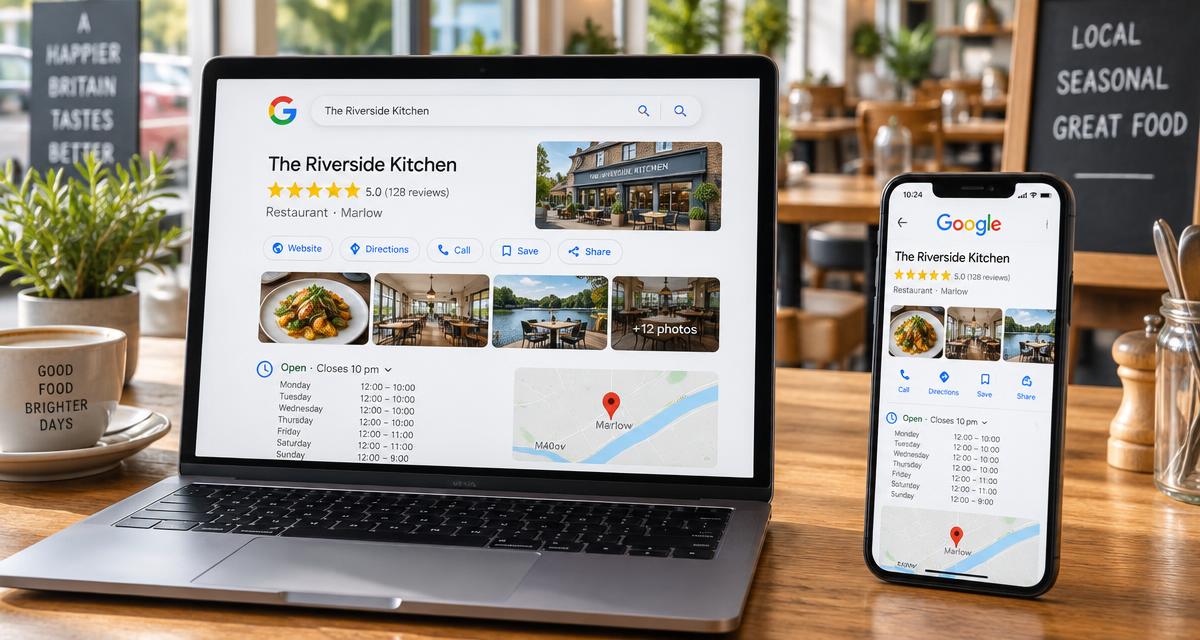
Your Google Business Profile should have the correct name, category, address, telephone number, opening hours and website. Check your special hours before bank holidays and other periods when your normal opening times change.
Photographs matter too.
Show the food people are actually going to receive. Add a few photographs of the space, the entrance or collection area, and anything that helps someone recognise the business when they arrive.
You don't need dozens of photographs. A handful of good, current ones is more useful than a gallery full of old or heavily edited images.
Your website and Google profile should also agree with each other. If one says you're open until 10pm and the other says 9pm, someone has to guess which one is right.
For more on how the two work together, see our guide to how your Google Business Profile and website work together.
Make ordering and booking obvious
There isn't one right way for a restaurant to take orders.
Some businesses use delivery marketplaces. Others take orders directly through their own website or by phone. Some use a booking service for tables and a separate service for takeaway.
Many use a mixture.
The important thing is that customers shouldn't have to work out how to order from you.
If you take orders through an external service, put a clear link on your website. If customers book by phone, make the number easy to find and tap on mobile. If you take table bookings online, make the booking button obvious.
Check the links yourself every so often, particularly if you change providers.
If you're comparing delivery, ordering or booking platforms, look at the current fees and terms directly with the provider. Check how menu changes are handled, who deals with refunds and what happens when an order goes wrong. The details can change, so old commission figures found in blog posts aren't necessarily useful.
OneLuton can link customers to your existing ordering or booking services, but it does not currently process restaurant orders or table bookings itself.
Show people what the place is really like
Good restaurant photography doesn't have to mean an expensive photo shoot.
You can get useful photographs with a phone if the light is good and the food looks the way it does when customers receive it.
Show a few dishes you are proud of. Show the room. Show the entrance. If you offer takeaway or collection, show customers where they need to go.
Try not to make everything look so heavily edited that it bears little resemblance to the real thing.
A customer isn't just deciding whether the food looks good. They're also trying to work out what kind of place you are.
Is it somewhere for a quick lunch? A family meal? A date night? A coffee and a chat? A takeaway after work?
Your photographs can answer some of those questions without saying a word.
If your photographs include recognisable customers or staff, make sure you have the appropriate permission before publishing them.
Don’t overlook the basics around food and privacy
Getting your restaurant online doesn't remove any of the responsibilities that come with running a food business.
If you're starting a new food business in the UK, you need to register with your local authority before trading. You also need to make sure the allergen information you provide is accurate and that customers have a clear way to ask questions when they need more information.
If you collect information through your website, such as names, email addresses or booking details, explain how you use it in your privacy notice.
You don't need to turn your website into a wall of legal text. You just need to make sure the information you provide is accurate and that you're handling customer information properly.
For anything that relates to food registration, allergens, privacy or cookies, check the current guidance from the relevant authority rather than relying on an old website article.
You don’t need a huge restaurant website
A small restaurant website can do its job with a handful of useful pages.
Home
Tell people what you are, where you are and what they can do next.
Menu
Show your current food and prices in a format that works well on a phone.
Visit or order
Give people the address, opening hours, telephone number and clear links for booking, ordering or collection.
Gallery
Show a few good photographs of the food and the space.
Contact
Give people a straightforward way to ask general questions.
That's enough to start.
You can always add more later if customers actually need it.
OneLuton can help you create this kind of starting point, with editable sections, a gallery, contact details and basic search settings. It can also give you a first draft to work from.
But don't publish the draft as-is. Check every detail yourself, particularly your menu, prices, opening hours, address and dietary information. Your website should reflect the restaurant that actually exists.
Once the website is live, you don't need to spend hours maintaining it.
Once a month, take a few minutes to check the basics.
Are the opening hours still right?
Does the menu match what you're actually serving?
Are the booking and ordering links working?
Are the prices consistent?
Do the photographs still represent the business?
Has anything changed that a new customer would need to know?
It's also worth checking the website and Google profile after bank holidays, menu changes, a move to new premises or a change in ordering provider.
A restaurant website doesn't need to publish something new every week to be useful.
It needs to be dependable.
When someone is hungry and looking for somewhere to eat, the job is fairly simple: help them understand what you serve, show them what the experience is like, give them the information they need and make it easy to take the next step.